<?xml version="1.0" encoding="utf-8"?><feed xmlns="http://www.w3.org/2005/Atom" ><generator uri="https://jekyllrb.com/" version="4.4.1">Jekyll</generator><link href="/feed.xml" rel="self" type="application/atom+xml" /><link href="/" rel="alternate" type="text/html" /><updated>2025-04-04T15:31:09+00:00</updated><id>/feed.xml</id><title type="html">Patrick Perkins</title><subtitle>Developer, composer, configuration addict.</subtitle><entry><title type="html">Adventures in Ruby LSP Limbo</title><link href="/2025/04/01/adventures-in-ruby-lsp-limbo.html" rel="alternate" type="text/html" title="Adventures in Ruby LSP Limbo" /><published>2025-04-01T00:00:00+00:00</published><updated>2025-04-01T00:00:00+00:00</updated><id>/2025/04/01/adventures-in-ruby-lsp-limbo</id><content type="html" xml:base="/2025/04/01/adventures-in-ruby-lsp-limbo.html"><![CDATA[<h3 id="the-issue">The Issue</h3>

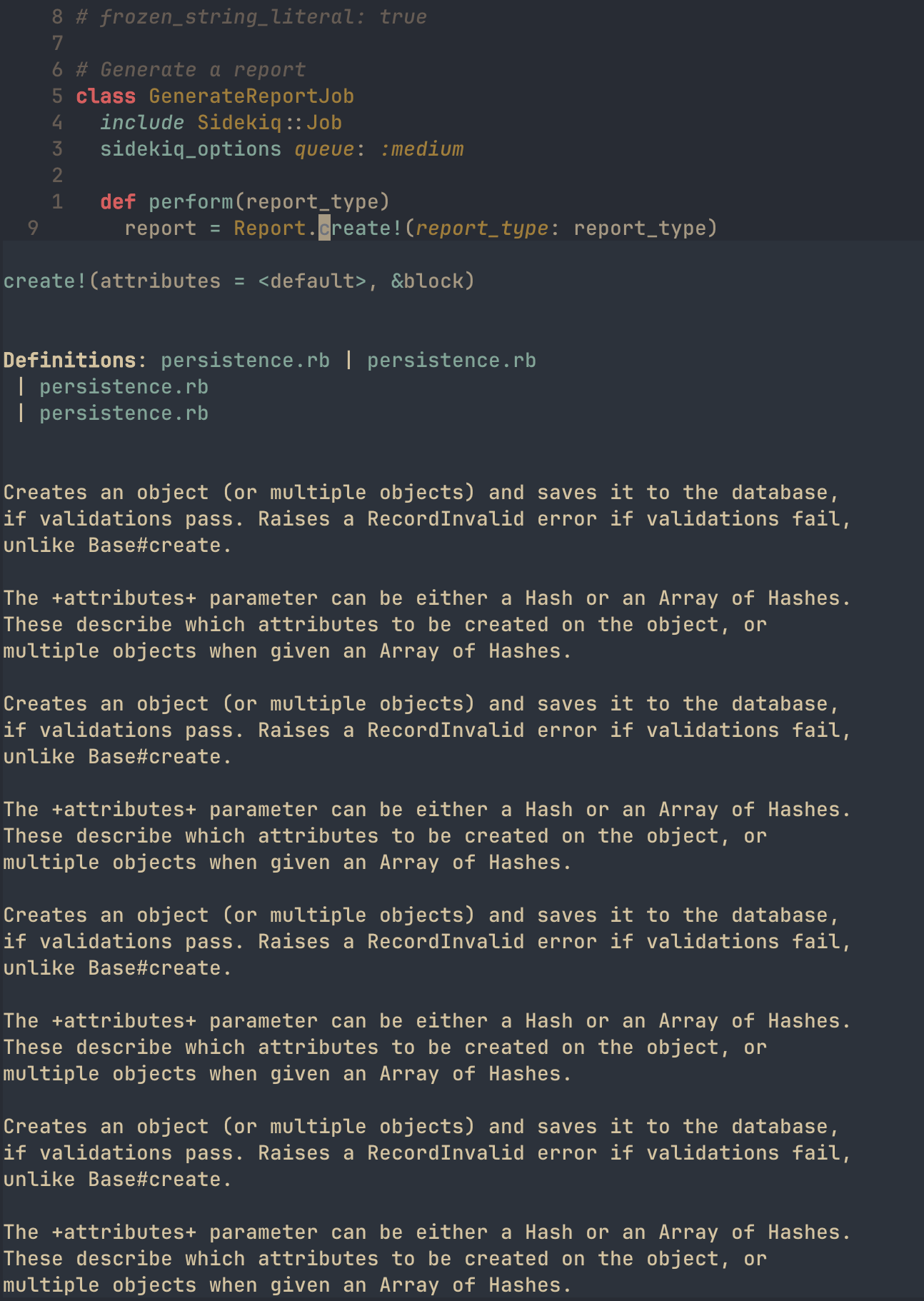
<p>In my current Neovim configuration, I’m using <a href="https://github.com/Shopify/ruby-lsp">ruby-lsp</a>, Shopify’s Ruby/Rails language server. Before this language server came along, there was <a href="https://solargraph.org/">solargraph</a>. While <code class="language-plaintext highlighter-rouge">ruby-lsp</code> seems to work great for things like <code class="language-plaintext highlighter-rouge">go to definition</code> and <code class="language-plaintext highlighter-rouge">hover</code> on Ruby and locally defined classes/methods, I really want to see hover documentation on my installed gems. For example, I want to press <code class="language-plaintext highlighter-rouge">Shift+k</code> on an <code class="language-plaintext highlighter-rouge">ActiveRecord</code> method. Here’s an example of what I’d like to achieve:</p>

<figure class="highlight"><pre><code class="language-ruby" data-lang="ruby"><span class="n">report</span> <span class="o">=</span> <span class="no">Report</span><span class="p">.</span><span class="nf">create!</span><span class="p">(</span><span class="ss">report_type: </span><span class="n">report_type</span><span class="p">)</span></code></pre></figure>

<p>In this one line, I’m calling <code class="language-plaintext highlighter-rouge">.create!</code> on an <code class="language-plaintext highlighter-rouge">ActiveRecord</code> model. I’d really like to <code class="language-plaintext highlighter-rouge">Shift+k</code> on that specific method and get documentation about how <code class="language-plaintext highlighter-rouge">.create!</code> works, how it differs from <code class="language-plaintext highlighter-rouge">.create</code>. With <code class="language-plaintext highlighter-rouge">ruby-lsp</code>, it seems to be the case that every gem method returns a <code class="language-plaintext highlighter-rouge">No information available</code> message in the status bar.</p>

<p>When I was looking into <code class="language-plaintext highlighter-rouge">solargraph</code>, I came across <a href="https://solargraph.org/guides/yard">this page</a> that describes how it uses <a href="https://www.rubydoc.info/gems/yard/file/README.md">YARD</a> to “gather information about your project and its gem dependencies”. I work on a team where we’re pretty strict about our YARD compliance, so this development excited me. My first instinct was to look into whether <code class="language-plaintext highlighter-rouge">ruby-lsp</code> supported this kind of parsing. I found <a href="https://github.com/Shopify/ruby-lsp/issues/2181">this issue</a> that stated the following:</p>

<blockquote>
  <p>Thank you for the feature suggestion.</p>

  <p>However, we will not add support for YARD annotations. There are multiple reasons for that</p>

  <div class="language-plaintext highlighter-rouge"><div class="highlight"><pre class="highlight"><code>1. We try to keep the Ruby LSP's concerns related only to Ruby itself. YARD is a separate gem and not every Ruby developer uses it

2. When it comes to adding type annotations, a complete gradual type system like Sorbet or Steep yields significantly better results. They provide the ability to narrow types, widen types, use generics, interfaces, etc - things that are not possible to do with YARD annotations

3. For handling declarations that occur via meta-programming, we are going to explore both options through our [addon system](https://github.com/Shopify/ruby-lsp/blob/main/ADDONS.md) and through RBS files. RBS is significantly more expressive and thus we will favor support for that for manually written annotations. And with the addon system we hope to provide APIs for other gems to teach the indexer how to handle their meta-programming DSLs
</code></pre></div>  </div>
</blockquote>

<p>While slightly disappointed to find that the team was not adding support for YARD annotations, their reasoning is understandable. Not everyone uses YARD and the focus of <code class="language-plaintext highlighter-rouge">ruby-lsp</code> should be Ruby. Support for YARD parsing through the add-on system is an interesting idea, and one that I may pursue myself. From my limited research (searching <code class="language-plaintext highlighter-rouge">ruby-lsp-</code> on <a href="https://rubygems.org/search?query=ruby-lsp-">rubygems</a>) I was not able to find any relevant addons for my area of interest.</p>

<h3 id="the-solution-maybe">The Solution (maybe?)</h3>

<p>Due to this limitation, I think I’d like to try <code class="language-plaintext highlighter-rouge">solargraph</code> with the <a href="https://github.com/iftheshoefritz/solargraph-rails">solargraph-rails</a> extension. I found <a href="https://www.reddit.com/r/ruby/comments/1hntoms/state_of_the_ruby_lsp_2025_what_do_you_think/m9vpfmz/">this Reddit comment</a> to be insightful:</p>

<blockquote>
  <p>Ruby-LSP and Solargraph take fundamentally different approaches. While Ruby-LSP relies more on fuzzy searching for class and method definitions (based on my observation as a user), Solargraph takes a more “sophisticated” approach, closely mimicking how Ruby itself resolves definitions. It accounts for module inclusions, extensions, and other language features, making its results more precise. Additionally, it supports YARD annotations, which help infer return types and handle metaprogramming gaps.</p>

  <p>For these reasons, Solargraph remains my LSP of choice—so much so that I even created the <code class="language-plaintext highlighter-rouge">solargraph-rspec</code> <a href="https://github.com/lekemula/solargraph-rspec">plugin</a> (apologies for the self-promotion!).</p>

  <p>With the release of version <code class="language-plaintext highlighter-rouge">0.51.0</code>, Solargraph now supports Ruby 3.4:<br />
🔗 <a href="https://github.com/castwide/solargraph/blob/master/CHANGELOG.md#0510---january-19-2025">Changelog</a></p>

  <p>As I mentioned <a href="https://github.com/castwide/solargraph/pull/739#issuecomment-2622570367">here</a>, thanks to <code class="language-plaintext highlighter-rouge">prism</code>’s translation support for the <code class="language-plaintext highlighter-rouge">parser</code> gem interface, transitioning to <code class="language-plaintext highlighter-rouge">prism</code> might not be as difficult as it sounds. I’m optimistic that this transition will happen in the near future. 🤞</p>
</blockquote>

<p>Given this information, I think it’s only fair that I give <code class="language-plaintext highlighter-rouge">solargraph</code> a go and see what happens. For the purposes of this demonstration, I’m going to use bundler to see if I can get accurate information for the gems in my project, instead of all gems installed in the local version. It would be nice to avoid including <code class="language-plaintext highlighter-rouge">solargraph</code> in my Gemfile (since my team members don’t use it), but I’m just experimenting. There are a couple things I have to do to switch over:</p>
<ul>
  <li>Uninstall <code class="language-plaintext highlighter-rouge">ruby-lsp</code> and <code class="language-plaintext highlighter-rouge">ruby-lsp-rails</code> in my local Rails app environment with <code class="language-plaintext highlighter-rouge">gem uninstall ruby-lsp ruby-lsp-rails</code></li>
  <li>Remove <code class="language-plaintext highlighter-rouge">.ruby-lsp</code> directory (don’t think this is necessary, but I’m going to do it anyways)</li>
  <li>Update my <code class="language-plaintext highlighter-rouge">nvim-lspconfig</code> to use <code class="language-plaintext highlighter-rouge">solargraph</code> instead of <code class="language-plaintext highlighter-rouge">ruby-lsp</code> for <code class="language-plaintext highlighter-rouge">ruby</code> filetypes
    <ul>
      <li>This includes configuring the <code class="language-plaintext highlighter-rouge">cmd</code> parameter to run <code class="language-plaintext highlighter-rouge">bundle</code> like this: `</li>
    </ul>
  </li>
</ul>

<figure class="highlight"><pre><code class="language-lua" data-lang="lua"><span class="n">lspconfig</span><span class="p">.</span><span class="n">solargraph</span><span class="p">.</span><span class="n">setup</span><span class="p">({</span>
    <span class="c1">-- capabilities are coming from my blink.cmp config</span>
    <span class="n">capabilities</span> <span class="o">=</span> <span class="n">capabilities</span><span class="p">,</span>
    <span class="n">cmd</span> <span class="o">=</span> <span class="p">{</span> <span class="s2">"bundle"</span><span class="p">,</span> <span class="s2">"exec"</span><span class="p">,</span> <span class="s2">"solargraph"</span><span class="p">,</span> <span class="s2">"stdio"</span> <span class="p">},</span>
<span class="p">})</span></code></pre></figure>

<ul>
  <li>Add <code class="language-plaintext highlighter-rouge">solargraph</code> and <code class="language-plaintext highlighter-rouge">solargraph-rails</code> to my Gemfile and <code class="language-plaintext highlighter-rouge">bundle install</code></li>
  <li>Configure <code class="language-plaintext highlighter-rouge">solargraph</code> with <code class="language-plaintext highlighter-rouge">.solargraph.yml</code></li>
  <li>I’m using <a href="https://github.com/lekemula/dotfiles/blob/main/.solargraph.yml">the config</a> from the aforementioned Reddit user as inspiration. A default config can be generated in the Rails app directory with <code class="language-plaintext highlighter-rouge">solargraph config</code>.</li>
  <li>Cache gem documentation with <code class="language-plaintext highlighter-rouge">bundle exec solargraph gems</code></li>
</ul>

<p>I’d prefer not to include <code class="language-plaintext highlighter-rouge">solargraph</code> in my Gemfile, but it may be the case that I need to run <code class="language-plaintext highlighter-rouge">bundle exec solargraph gems</code> to cache gem documentation for my specific project instead of all gems in the local Ruby version.</p>

<p>After <code class="language-plaintext highlighter-rouge">solargraph</code> has been installed and configured, I test that it has attached to my buffer by running <code class="language-plaintext highlighter-rouge">:LspInfo</code>:</p>

<figure class="highlight"><pre><code class="language-lua" data-lang="lua"><span class="n">vim</span><span class="p">.</span><span class="n">lsp</span><span class="p">:</span> <span class="n">Active</span> <span class="n">Clients</span> <span class="err">~</span>
<span class="o">-</span> <span class="n">solargraph</span> <span class="p">(</span><span class="n">id</span><span class="p">:</span> <span class="mi">1</span><span class="p">)</span>
  <span class="o">-</span> <span class="n">Version</span><span class="p">:</span> <span class="err">?</span> <span class="p">(</span><span class="n">no</span> <span class="n">serverInfo</span><span class="p">.</span><span class="n">version</span> <span class="n">response</span><span class="p">)</span>
  <span class="o">-</span> <span class="n">Root</span> <span class="n">directory</span><span class="p">:</span> <span class="err">~</span><span class="o">/</span><span class="n">code</span><span class="o">/</span><span class="n">w</span><span class="o">/</span><span class="n">apotheca</span><span class="o">/</span><span class="n">rails_app</span>
  <span class="o">-</span> <span class="n">Command</span><span class="p">:</span> <span class="p">{</span> <span class="s2">"~/.local/share/mise/installs/ruby/3.4.1/bin/bundle"</span><span class="p">,</span> <span class="s2">"exec"</span><span class="p">,</span> <span class="s2">"solargraph"</span><span class="p">,</span> <span class="s2">"stdio"</span> <span class="p">}</span>
  <span class="o">-</span> <span class="n">Settings</span><span class="p">:</span> <span class="p">{</span>
      <span class="n">solargraph</span> <span class="o">=</span> <span class="p">{</span>
        <span class="n">diagnostics</span> <span class="o">=</span> <span class="kc">true</span>
      <span class="p">}</span>
    <span class="p">}</span>
  <span class="o">-</span> <span class="n">Attached</span> <span class="n">buffers</span><span class="p">:</span> <span class="mi">2</span><span class="p">,</span> <span class="mi">11</span></code></pre></figure>

<p>Yay! <code class="language-plaintext highlighter-rouge">solargraph</code> is up and running. Let’s see if I get documentation on my aforementioned <code class="language-plaintext highlighter-rouge">.create!</code> method. 
Dang… “No information available” :(</p>

<p>I’m able to get comprehensive LSP logs by enabling <code class="language-plaintext highlighter-rouge">vim.lsp.set_log_level("debug")</code> in my <code class="language-plaintext highlighter-rouge">init.lua</code> Neovim config. Here’s the output after pressing <code class="language-plaintext highlighter-rouge">Shift+k</code>:</p>

<div class="language-plaintext highlighter-rouge"><div class="highlight"><pre class="highlight"><code>[DEBUG][2025-03-31 15:54:24] ...m/lsp/client.lua:677	"LSP[solargraph]"	"client.request"	1	"textDocument/hover"	{ position = { character = 20, line = 8 }, textDocument = { uri = "rails_app/app/jobs/generate_report_job.rb" } }	&lt;function 1&gt;	11
[DEBUG][2025-03-31 15:54:24] .../vim/lsp/rpc.lua:277	"rpc.send"	{ id = 5, jsonrpc = "2.0", method = "textDocument/hover", params = { position = { character = 20, line = 8 }, textDocument = { uri = "rails_app/app/jobs/generate_report_job.rb" } } }
[DEBUG][2025-03-31 15:54:24] .../vim/lsp/rpc.lua:391	"rpc.receive"	{ id = 5, jsonrpc = "2.0" }
</code></pre></div></div>
<p>We can see here that there’s no content in the response from the LSP. Let’s see what happens if we try another method. I went to my model and hovered over the following line:</p>

<figure class="highlight"><pre><code class="language-ruby" data-lang="ruby"><span class="s2">"ReportService::</span><span class="si">#{</span><span class="n">report_type</span><span class="p">.</span><span class="nf">to_s</span><span class="p">.</span><span class="nf">camelize</span><span class="si">}</span><span class="s2">"</span><span class="p">.</span><span class="nf">safe_constantize</span><span class="p">.</span><span class="nf">new</span></code></pre></figure>

<p>which outputted the following in my LSP log:</p>
<div class="language-plaintext highlighter-rouge"><div class="highlight"><pre class="highlight"><code>[DEBUG][2025-03-31 16:15:33] ...m/lsp/client.lua:677	"LSP[solargraph]"	"client.request"	1	"textDocument/hover"	{ position = { character = 50, line = 52 }, textDocument = { uri = "rails_app/app/models/report.rb" } }	&lt;function 1&gt;	2
[DEBUG][2025-03-31 16:15:33] .../vim/lsp/rpc.lua:277	"rpc.send"	{ id = 54, jsonrpc = "2.0", method = "textDocument/hover", params = { position = { character = 50, line = 52 }, textDocument = { uri = "rails_app/app/models/report.rb" } } }
[DEBUG][2025-03-31 16:15:33] .../vim/lsp/rpc.lua:391	"rpc.receive"	{ id = 54, jsonrpc = "2.0", result = { contents = { kind = "markdown", value = "String#safe_constantize\n\n+safe\\_constantize+ tries to find a declared constant with the name specified  \nin the string. It returns +nil+ when the name is not in CamelCase  \nor is not initialized.\n\n\n```ruby\n'Module'.safe_constantize  # =&gt; Module\n'Class'.safe_constantize   # =&gt; Class\n'blargle'.safe_constantize # =&gt; nil\n```\n\nSee ActiveSupport::Inflector.safe\\_constantize.\n\nVisibility: public" } } }
</code></pre></div></div>

<p>From the logs, we can see that triggering a <code class="language-plaintext highlighter-rouge">textDocument/hover</code> event on <code class="language-plaintext highlighter-rouge">.safe_constantize</code> returns the documentation in the <code class="language-plaintext highlighter-rouge">result</code> key.</p>

<p>Let’s dig into both of these examples and see if we can figure out why one is working and the other isn’t. First, let’s start with my <code class="language-plaintext highlighter-rouge">Report.create!(...)</code> call. <code class="language-plaintext highlighter-rouge">.create!</code> In Rails <code class="language-plaintext highlighter-rouge">v7.1.5.1</code>, <code class="language-plaintext highlighter-rouge">.create!</code> is a method inside <code class="language-plaintext highlighter-rouge">ActiveRecord::Persistence::ClassMethods</code>. Here’s the source code from the Rails <code class="language-plaintext highlighter-rouge">v7.1.5.1</code> tag on GitHub:</p>

<figure class="highlight"><pre><code class="language-ruby" data-lang="ruby"><span class="c1"># Creates an object (or multiple objects) and saves it to the database,</span>
<span class="c1"># if validations pass. Raises a RecordInvalid error if validations fail,</span>
<span class="c1"># unlike Base#create.</span>
<span class="c1">#</span>
<span class="c1"># The +attributes+ parameter can be either a Hash or an Array of Hashes.</span>
<span class="c1"># These describe which attributes to be created on the object, or</span>
<span class="c1"># multiple objects when given an Array of Hashes.</span>
<span class="k">def</span> <span class="nf">create!</span><span class="p">(</span><span class="n">attributes</span> <span class="o">=</span> <span class="kp">nil</span><span class="p">,</span> <span class="o">&amp;</span><span class="n">block</span><span class="p">)</span>
  <span class="k">if</span> <span class="n">attributes</span><span class="p">.</span><span class="nf">is_a?</span><span class="p">(</span><span class="no">Array</span><span class="p">)</span>
    <span class="n">attributes</span><span class="p">.</span><span class="nf">collect</span> <span class="p">{</span> <span class="o">|</span><span class="kp">attr</span><span class="o">|</span> <span class="n">create!</span><span class="p">(</span><span class="kp">attr</span><span class="p">,</span> <span class="o">&amp;</span><span class="n">block</span><span class="p">)</span> <span class="p">}</span>
  <span class="k">else</span>
    <span class="n">object</span> <span class="o">=</span> <span class="n">new</span><span class="p">(</span><span class="n">attributes</span><span class="p">,</span> <span class="o">&amp;</span><span class="n">block</span><span class="p">)</span>
    <span class="n">object</span><span class="p">.</span><span class="nf">save!</span>
    <span class="n">object</span>
  <span class="k">end</span>
<span class="k">end</span></code></pre></figure>

<p>We can see here that the documentation is clearly defined. Given <code class="language-plaintext highlighter-rouge">solargraph</code>’s ability to parse YARD docs into LSP documentation, this should show up IF <code class="language-plaintext highlighter-rouge">solargraph</code> is able to figure out that the <code class="language-plaintext highlighter-rouge">.create!</code> that I’m calling is, in fact, the one defined in <code class="language-plaintext highlighter-rouge">ActiveRecord::Persistence::ClassMethods</code>. If I run <code class="language-plaintext highlighter-rouge">bundle exec yard server --gems</code> in the root of my project directory, I get interactive YARD docs for my installed gems at <code class="language-plaintext highlighter-rouge">localhost::8808</code>. If I navigate to <code class="language-plaintext highlighter-rouge">ActiveRecord::Persistence::ClassMethods</code>, I see docs for the <code class="language-plaintext highlighter-rouge">.create!</code> method! Something is not right…</p>

<p>Digging around in the <code class="language-plaintext highlighter-rouge">solargraph</code> repo, I found <a href="https://gist.github.com/castwide/28b349566a223dfb439a337aea29713e">this gist</a>. A comment at the top reveals what might be going wrong:</p>

<figure class="highlight"><pre><code class="language-ruby" data-lang="ruby"><span class="c1"># The following comments fill some of the gaps in Solargraph's understanding of</span>
<span class="c1"># Rails apps. Since they're all in YARD, they get mapped in Solargraph but</span>
<span class="c1"># ignored at runtime.</span></code></pre></figure>

<p>Adding the gist to the root of the directory “fills some of the gaps” in how <code class="language-plaintext highlighter-rouge">solargraph</code> works with Rails apps. If we can trick <code class="language-plaintext highlighter-rouge">solargraph</code> into parsing this file as valid Ruby code, we should be able to get intellisense and hover definitions, even if we don’t explicitly include/extend these modules/classes in other places.</p>

<p>After adding the contents of the gist to a file called <code class="language-plaintext highlighter-rouge">solargraph_extensions.rb</code> to the root of my directory and restarting <code class="language-plaintext highlighter-rouge">solargraph</code>, I was praying that <code class="language-plaintext highlighter-rouge">Shift+k</code> on my <code class="language-plaintext highlighter-rouge">Report.create!(...)</code> would give me hover docs. And…</p>

<p>“No information available.”</p>

<p>I’m starting to run out of steam on this. As a last ditch effort, I tried running <code class="language-plaintext highlighter-rouge">solargraph scan -v</code>. This command does the following, according to the command line documentation:</p>
<blockquote>
  <p>A scan loads the entire workspace to make sure that the ASTs and maps do not raise errors during analysis. It does not perform any type checking or validation; it only confirms that the analysis itself is error-free.</p>
</blockquote>

<p>After a mostly successful scan, I noticed an error when parsing <code class="language-plaintext highlighter-rouge">Thor</code>, the tool used to build CLIs in Rails apps. The scan outputted the following error:</p>
<div class="language-plaintext highlighter-rouge"><div class="highlight"><pre class="highlight"><code>[Solargraph::ComplexTypeError]: Invalid close in type DidYouMean::SpellChecker)
</code></pre></div></div>
<p>You can <a href="https://github.com/castwide/solargraph/issues/861">view the whole stack trace</a> in the error I reported in the <code class="language-plaintext highlighter-rouge">solargraph</code> repo. For now, I’m going to tell myself that my additional documentation isn’t loading because I’m erroring out during the <code class="language-plaintext highlighter-rouge">solargraph</code> indexing process. Whether or not this is true, I’m not sure. I am <em>definitely</em> sure that I’m done for the night…</p>

<h3 id="the-next-day">The Next Day</h3>

<p>Something extraordinary has occurred. I have figured something out. This problem may have been unique to my development setup for the project I’m working on. At my place of work, we have a standardized setup for our development environments. It looks like this:</p>
<ol>
  <li>Boot up a Vagrant machine</li>
  <li>Spin up all the application services using a Docker Swarm</li>
  <li>Boot up the Rails app after everything is set up</li>
  <li>Sync the local <code class="language-plaintext highlighter-rouge">rails_app</code> folder with the <code class="language-plaintext highlighter-rouge">rails_app</code> folder in the Vagrant box</li>
</ol>

<p>This allows for a development environment that can be developed locally in an editor, but we have to run our Rails commands, like <code class="language-plaintext highlighter-rouge">bundle exec rspec</code> inside the Docker container INSIDE the Vagrant box. This isn’t too bad, it just takes a couple extra steps.</p>

<p>LSP (Language Server Protocol) integration was the tricky part of this setup. After some experimentation with connecting to the LSP running inside the Vagrant box, I decided I would just run the same version of <code class="language-plaintext highlighter-rouge">ruby-lsp</code> locally, as it was close enough.</p>

<p>The whole reason I decided I wanted to switch over to <code class="language-plaintext highlighter-rouge">solargraph</code> was because I believed that <code class="language-plaintext highlighter-rouge">ruby-lsp</code> didn’t support any Rails documentation, just raw Ruby stuff. This was a misinformed assumption, as I didn’t really understand how <code class="language-plaintext highlighter-rouge">ruby-lsp-rails</code> worked.</p>

<p>Upon a little more reading, I read something that piqued my interest:</p>

<blockquote>
  <h2 id="runtime-introspection">Runtime Introspection</h2>

  <p>LSP tooling is typically based on static analysis, but <code class="language-plaintext highlighter-rouge">ruby-lsp-rails</code> actually communicates with your Rails app for some features.</p>

  <p>When Ruby LSP Rails starts, it spawns a <code class="language-plaintext highlighter-rouge">rails runner</code> instance which runs <a href="https://github.com/Shopify/ruby-lsp-rails/blob/main/lib/ruby_lsp/ruby_lsp_rails/server.rb"><code class="language-plaintext highlighter-rouge">server.rb</code></a>. The add-on communicates with this process over a pipe (i.e. <code class="language-plaintext highlighter-rouge">stdin</code> and <code class="language-plaintext highlighter-rouge">stdout</code>) to fetch runtime information about the application.</p>

  <p>When extension is stopped (e.g. by quitting the editor), the server instance is shut down.</p>
</blockquote>

<p>When I read this, the thought occurred to me: “What if <code class="language-plaintext highlighter-rouge">rails runner</code> isn’t working because of my complicated development environment?”</p>

<p>I tried this command:</p>

<div class="language-shell highlighter-rouge"><div class="highlight"><pre class="highlight"><code>bin/rails rails runner ~/.local/share/mise/installs/ruby/3.4.1/lib/ruby/gems/3.4.0/gems/ruby-lsp-rails-0.4.0/lib/ruby_lsp/ruby_lsp_rails/server.rb start
</code></pre></div></div>

<p>and I got the following output:</p>

<div class="language-plaintext highlighter-rouge"><div class="highlight"><pre class="highlight"><code>.local/share/mise/installs/ruby/3.4.1/lib/ruby/gems/3.4.0/gems/activesupport-7.1.5.1/lib/active_support/message_encryptor.rb:307:in 'OpenSSL::Cipher#key=': key must be 16 bytes (ArgumentError)
</code></pre></div></div>

<p>What if something about my local credentials file wasn’t being synced correctly and this was preventing <code class="language-plaintext highlighter-rouge">ruby-lsp-rails</code> from spinning up the Runtime Introspection? What if that was preventing my LSP client from receiving better documentation for Rails classes/methods?</p>

<p>After <code class="language-plaintext highlighter-rouge">ssh</code>ing into my virtual machine, copying the encrypted key, removing my current <code class="language-plaintext highlighter-rouge">development.key</code>(which was empty) and replacing it with the contents of the remote file, I watched the LSP logs for signs of life.</p>

<div class="language-shell highlighter-rouge"><div class="highlight"><pre class="highlight"><code><span class="o">[</span>INFO][2025-04-01 13:37:23] ...lsp/handlers.lua:566	<span class="s2">"Finished booting Ruby LSP Rails server"</span>
</code></pre></div></div>

<p>Ok… This looks good. I haven’t seen this in the logs before. Let’s try <code class="language-plaintext highlighter-rouge">Shift+k</code> on my <code class="language-plaintext highlighter-rouge">.create!</code> method.</p>

<p><img src="/assets/img/ruby-lsp-success.png" alt="Screenshot of Neovim showing successful lsp hover documentation" /></p>

<h1>😭</h1>]]></content><author><name></name></author><category term="neovim" /><category term="ruby" /><category term="ruby-lsp" /><category term="rails" /><summary type="html"><![CDATA[The Issue]]></summary></entry><entry><title type="html">Custom Blacklight Advanced Search Faceting</title><link href="/2024/10/21/custom-blacklight-advanced-search-faceting.html" rel="alternate" type="text/html" title="Custom Blacklight Advanced Search Faceting" /><published>2024-10-21T00:00:00+00:00</published><updated>2024-10-21T00:00:00+00:00</updated><id>/2024/10/21/custom-blacklight-advanced-search-faceting</id><content type="html" xml:base="/2024/10/21/custom-blacklight-advanced-search-faceting.html"><![CDATA[<p>At the time of writing this guide, there is a significant bug in how we limit facets that exceed the default limit of 10. The <a href="https://github.com/projectblacklight/blacklight/issues/3236">issue #3236</a> here goes into more detail about the specifics of this problem but - if you’ve found this blog post, chances are you’ve run into the problem yourself.</p>

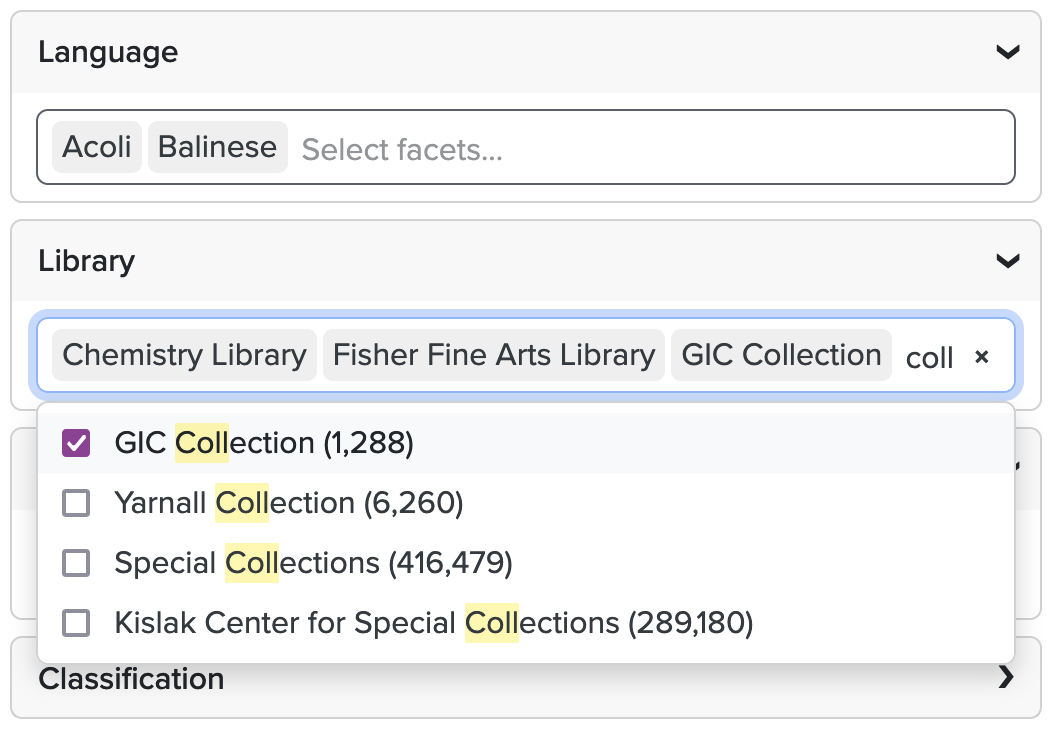
<p>The gist is this: the “more” modal that pops up on the advanced search page is the same one that it used for basic search. However, the advanced search facets differ from the basic search facets because they are multi-select, resulting in a functional inconsistency. Clicking on a facet within this modal links to a search instead of checking a checkbox.</p>

<p>I chose to implement a custom JS solution that would give the user a clean, searchable interface that falls in line with what one would expect from a multi-select dropdown. For my implementation, I chose <a href="https://tom-select.js.org/">TomSelect</a> - It’s small, functional, and has a Bootstrap 5 theme that blends nicely with <a href="https://find.library.upenn.edu/">our catalog</a>. It’s likely that you could implement another JS dropdown fairly easily, but this guide will focus on TomSelect specifically.</p>

<p><img src="/assets/img/adv-search-faceting.png" alt="Screenshot showing a custom blacklight advanced search faceting implementation" /></p>

<h3 id="removing-the-facet-limit">Removing the Facet Limit</h3>
<p>The first step in this implementation is to remove the default limit of 10 facets on the advanced search page. Without doing this, only the first 10 facets will show up in our dropdown. For this guide, I’m using Blacklight 8.3.0, which has Advanced Search built in. Because this built-in version is slightly less configurable than the Advanced Search plugin, we need to add some configuration options to our search builder.</p>
<div class="language-ruby highlighter-rouge"><div class="highlight"><pre class="highlight"><code><span class="c1"># This class extends Blacklight::SearchBuilder to add additional functionality</span>
<span class="k">class</span> <span class="nc">SearchBuilder</span> <span class="o">&lt;</span> <span class="no">Blacklight</span><span class="o">::</span><span class="no">SearchBuilder</span>
  <span class="kp">include</span> <span class="no">Blacklight</span><span class="o">::</span><span class="no">Solr</span><span class="o">::</span><span class="no">SearchBuilderBehavior</span>

  <span class="nb">self</span><span class="p">.</span><span class="nf">default_processor_chain</span> <span class="o">+=</span> <span class="p">[</span><span class="ss">:facets_for_advanced_search_form</span><span class="p">]</span>

  <span class="c1"># Merge the advanced search form parameters into the solr parameters</span>
  <span class="c1"># @param [Hash] solr_p the current solr parameters</span>
  <span class="c1"># @return [Hash] the solr parameters with the additional advanced search form parameters</span>
  <span class="k">def</span> <span class="nf">facets_for_advanced_search_form</span><span class="p">(</span><span class="n">solr_p</span><span class="p">)</span>
    <span class="k">return</span> <span class="k">unless</span> <span class="n">search_state</span><span class="p">.</span><span class="nf">controller</span><span class="o">&amp;</span><span class="p">.</span><span class="nf">action_name</span> <span class="o">==</span> <span class="s1">'advanced_search'</span> <span class="o">&amp;&amp;</span>
                  <span class="n">blacklight_config</span><span class="p">.</span><span class="nf">advanced_search</span><span class="p">[</span><span class="ss">:form_solr_parameters</span><span class="p">]</span>

    <span class="n">solr_p</span><span class="p">.</span><span class="nf">merge!</span><span class="p">(</span><span class="n">blacklight_config</span><span class="p">.</span><span class="nf">advanced_search</span><span class="p">[</span><span class="ss">:form_solr_parameters</span><span class="p">])</span>
  <span class="k">end</span>
<span class="k">end</span>
</code></pre></div></div>
<p>We add a new step to our <code class="language-plaintext highlighter-rouge">default_processor_chain</code> that merges in some new advanced search parameters to our existing Solr parameters. With this configuration in place, we can add the following configuration to our <code class="language-plaintext highlighter-rouge">catalog_controller.rb</code>:</p>
<div class="language-ruby highlighter-rouge"><div class="highlight"><pre class="highlight"><code><span class="c1"># Remove facet limits on the advanced search form; if we limit these, we see the modal that does not allow for</span>
<span class="c1"># multiple selection, which is essential to the advanced search facet functionality.</span>
<span class="n">config</span><span class="p">.</span><span class="nf">advanced_search</span> <span class="o">=</span> <span class="no">Blacklight</span><span class="o">::</span><span class="no">OpenStructWithHashAccess</span><span class="p">.</span><span class="nf">new</span><span class="p">(</span>
  <span class="ss">enabled: </span><span class="kp">true</span><span class="p">,</span>
  <span class="ss">form_solr_parameters: </span><span class="p">{</span>
    <span class="s1">'facet.field'</span><span class="p">:</span> <span class="sx">%w[access_facet format_facet language_facet library_facet
                      location_facet classification_facet recently_published_facet]</span><span class="p">,</span>
    <span class="s1">'f.access_facet.facet.limit'</span><span class="p">:</span> <span class="s1">'-1'</span><span class="p">,</span>
    <span class="s1">'f.format_facet.facet.limit'</span><span class="p">:</span> <span class="s1">'-1'</span><span class="p">,</span>
    <span class="s1">'f.language_facet.facet.limit'</span><span class="p">:</span> <span class="s1">'-1'</span><span class="p">,</span>
    <span class="s1">'f.library_facet.facet.limit'</span><span class="p">:</span> <span class="s1">'-1'</span><span class="p">,</span>
    <span class="s1">'f.location_facet.facet.limit'</span><span class="p">:</span> <span class="s1">'-1'</span><span class="p">,</span>
    <span class="s1">'f.classification_facet.facet.limit'</span><span class="p">:</span> <span class="s1">'-1'</span><span class="p">,</span>
    <span class="s1">'f.recently_published_facet.facet.limit'</span><span class="p">:</span> <span class="s1">'-1'</span>
  <span class="p">}</span>
<span class="p">)</span>
</code></pre></div></div>
<p>By setting the facet limit to <code class="language-plaintext highlighter-rouge">-1</code>, we effectively disable the limit altogether and receive a comprehensive list of all facets with our query. In this example, I’m setting these params for the specific facets that I chose to include on my advanced search form. You’ll have to decide which facets you’d like to include and update this config accordingly.</p>

<h3 id="creating-a-custom-component">Creating a Custom Component</h3>
<p>We’ll need a custom component for our multi-select facet. I chose to name mine <code class="language-plaintext highlighter-rouge">MultiSelectFacetComponent</code>. Here’s what mine looks like:</p>
<div class="language-ruby highlighter-rouge"><div class="highlight"><pre class="highlight"><code><span class="k">module</span> <span class="nn">Catalog</span>
  <span class="k">module</span> <span class="nn">AdvancedSearch</span>
    <span class="c1"># Multi select facet component using TomSelect</span>
    <span class="k">class</span> <span class="nc">MultiSelectFacetComponent</span> <span class="o">&lt;</span> <span class="no">Blacklight</span><span class="o">::</span><span class="no">Component</span>
      <span class="k">def</span> <span class="nf">initialize</span><span class="p">(</span><span class="n">facet_field</span><span class="p">:,</span> <span class="ss">layout: </span><span class="kp">nil</span><span class="p">)</span>
        <span class="vi">@facet_field</span> <span class="o">=</span> <span class="n">facet_field</span>
        <span class="vi">@layout</span> <span class="o">=</span> <span class="n">layout</span> <span class="o">==</span> <span class="kp">false</span> <span class="p">?</span> <span class="no">FacetFieldNoLayoutComponent</span> <span class="p">:</span> <span class="no">Blacklight</span><span class="o">::</span><span class="no">FacetFieldComponent</span>
      <span class="k">end</span>

      <span class="c1"># @return [Boolean] whether to render the component</span>
      <span class="k">def</span> <span class="nf">render?</span>
        <span class="n">presenters</span><span class="p">.</span><span class="nf">any?</span>
      <span class="k">end</span>

      <span class="c1"># @return [Array&lt;Blacklight::FacetFieldPresenter&gt;] array of facet field presenters</span>
      <span class="k">def</span> <span class="nf">presenters</span>
        <span class="k">return</span> <span class="p">[]</span> <span class="k">unless</span> <span class="vi">@facet_field</span><span class="p">.</span><span class="nf">paginator</span>

        <span class="k">return</span> <span class="n">to_enum</span><span class="p">(</span><span class="ss">:presenters</span><span class="p">)</span> <span class="k">unless</span> <span class="nb">block_given?</span>

        <span class="vi">@facet_field</span><span class="p">.</span><span class="nf">paginator</span><span class="p">.</span><span class="nf">items</span><span class="p">.</span><span class="nf">each</span> <span class="k">do</span> <span class="o">|</span><span class="n">item</span><span class="o">|</span>
          <span class="k">yield</span> <span class="vi">@facet_field</span><span class="p">.</span><span class="nf">facet_field</span>
                            <span class="p">.</span><span class="nf">item_presenter</span>
                            <span class="p">.</span><span class="nf">new</span><span class="p">(</span><span class="n">item</span><span class="p">,</span> <span class="vi">@facet_field</span><span class="p">.</span><span class="nf">facet_field</span><span class="p">,</span> <span class="n">helpers</span><span class="p">,</span> <span class="vi">@facet_field</span><span class="p">.</span><span class="nf">key</span><span class="p">,</span> <span class="vi">@facet_field</span><span class="p">.</span><span class="nf">search_state</span><span class="p">)</span>
        <span class="k">end</span>
      <span class="k">end</span>

      <span class="c1"># @return [Hash] HTML attributes for the select element</span>
      <span class="k">def</span> <span class="nf">select_attributes</span>
        <span class="p">{</span>
          <span class="ss">class: </span><span class="s2">"</span><span class="si">#{</span><span class="vi">@facet_field</span><span class="p">.</span><span class="nf">key</span><span class="si">}</span><span class="s2">-select"</span><span class="p">,</span>
          <span class="ss">name: </span><span class="s2">"f_inclusive[</span><span class="si">#{</span><span class="vi">@facet_field</span><span class="p">.</span><span class="nf">key</span><span class="si">}</span><span class="s2">][]"</span><span class="p">,</span>
          <span class="ss">placeholder: </span><span class="no">I18n</span><span class="p">.</span><span class="nf">t</span><span class="p">(</span><span class="s1">'facets.advanced_search.placeholder'</span><span class="p">),</span>
          <span class="ss">multiple: </span><span class="kp">true</span><span class="p">,</span>
          <span class="ss">data: </span><span class="p">{</span>
            <span class="ss">controller: </span><span class="s1">'multi-select'</span><span class="p">,</span>
            <span class="ss">multi_select_plugins_value: </span><span class="n">select_plugins</span><span class="p">.</span><span class="nf">to_json</span>
          <span class="p">}</span>
        <span class="p">}</span>
      <span class="k">end</span>

      <span class="c1"># @return [Hash] HTML attributes for the option elements within the select element</span>
      <span class="k">def</span> <span class="nf">option_attributes</span><span class="p">(</span><span class="n">presenter</span><span class="p">:)</span>
        <span class="p">{</span>
          <span class="ss">value: </span><span class="n">presenter</span><span class="p">.</span><span class="nf">value</span><span class="p">,</span>
          <span class="ss">selected: </span><span class="n">presenter</span><span class="p">.</span><span class="nf">selected?</span> <span class="p">?</span> <span class="s1">'selected'</span> <span class="p">:</span> <span class="kp">nil</span>
        <span class="p">}</span>
      <span class="k">end</span>

      <span class="c1"># TomSelect functionality can be expanded with plugins. `checkbox_options`</span>
      <span class="c1"># allow us to use the existing advanced search facet logic by using checkboxes.</span>
      <span class="c1"># More plugins can be found here: https://tom-select.js.org/plugins/</span>
      <span class="c1">#</span>
      <span class="c1"># @return [Array&lt;String&gt;] array of TomSelect plugins</span>
      <span class="k">def</span> <span class="nf">select_plugins</span>
        <span class="sx">%w[checkbox_options caret_position input_autogrow clear_button]</span>
      <span class="k">end</span>
    <span class="k">end</span>
  <span class="k">end</span>
<span class="k">end</span>
</code></pre></div></div>
<p>The <code class="language-plaintext highlighter-rouge">presenters</code>, <code class="language-plaintext highlighter-rouge">render</code>, and <code class="language-plaintext highlighter-rouge">initialize</code> method are copied over from the default Blacklight <code class="language-plaintext highlighter-rouge">FacetFieldCheckboxesComponent</code> which can be found <a href="https://github.com/projectblacklight/blacklight/blob/da6083277c9d1f29dad925247aff5ed28f4012ec/app/components/blacklight/facet_field_checkboxes_component.rb#L4">here</a>. Let’s expand on some of the other methods.</p>
<div class="language-ruby highlighter-rouge"><div class="highlight"><pre class="highlight"><code><span class="c1"># @return [Hash] HTML attributes for the select element</span>
<span class="k">def</span> <span class="nf">select_attributes</span>
  <span class="p">{</span>
    <span class="ss">class: </span><span class="s2">"</span><span class="si">#{</span><span class="vi">@facet_field</span><span class="p">.</span><span class="nf">key</span><span class="si">}</span><span class="s2">-select"</span><span class="p">,</span>
    <span class="ss">name: </span><span class="s2">"f_inclusive[</span><span class="si">#{</span><span class="vi">@facet_field</span><span class="p">.</span><span class="nf">key</span><span class="si">}</span><span class="s2">][]"</span><span class="p">,</span>
    <span class="ss">placeholder: </span><span class="no">I18n</span><span class="p">.</span><span class="nf">t</span><span class="p">(</span><span class="s1">'facets.advanced_search.placeholder'</span><span class="p">),</span>
    <span class="ss">multiple: </span><span class="kp">true</span><span class="p">,</span>
    <span class="ss">data: </span><span class="p">{</span>
  	<span class="ss">controller: </span><span class="s1">'multi-select'</span><span class="p">,</span>
  	<span class="ss">multi_select_plugins_value: </span><span class="n">select_plugins</span><span class="p">.</span><span class="nf">to_json</span>
    <span class="p">}</span>
  <span class="p">}</span>
<span class="k">end</span>
</code></pre></div></div>
<p>As you might be able to tell, these are attributes on the select element in the generated HTML. The most important value here is the <code class="language-plaintext highlighter-rouge">name</code> - in order for the facets to work correctly, we have to name this parameter properly. This allows us to properly facet on form submission. <code class="language-plaintext highlighter-rouge">class</code> and <code class="language-plaintext highlighter-rouge">placeholer</code> will depend on the specifics of your implementation. <code class="language-plaintext highlighter-rouge">multiple</code> should always be enabled if we want the select box to work as a multi-select. <code class="language-plaintext highlighter-rouge">data</code> allows us to connect to our Stimulus controller (called <code class="language-plaintext highlighter-rouge">multi_select_controller.js</code>), which we’ll go over later. TomSelect allows for expanded functionality using plugins - I chose to specify these in the component like this:</p>
<div class="language-ruby highlighter-rouge"><div class="highlight"><pre class="highlight"><code><span class="k">def</span> <span class="nf">select_plugins</span>
  <span class="sx">%w[checkbox_options caret_position input_autogrow clear_button]</span>
<span class="k">end</span>
</code></pre></div></div>
<p>These values will be read into the Stimulus controller and used when we instantiate TomSelect.</p>

<h4 id="the-view">The View</h4>
<div class="language-ruby highlighter-rouge"><div class="highlight"><pre class="highlight"><code><span class="o">&lt;</span><span class="sx">%= render(@layout.new(facet_field: @facet_field)) do |component| %&gt;  
  &lt;% component.with_label do %&gt;  
    &lt;%=</span> <span class="vi">@facet_field</span><span class="p">.</span><span class="nf">label</span> <span class="sx">%&gt;  
  &lt;% end %&gt;</span>  
  <span class="o">&lt;</span><span class="sx">% component.with_body </span><span class="k">do</span> <span class="sx">%&gt;  
    &lt;div class="facet-multi-select"&gt;</span>  
      <span class="o">&lt;</span><span class="nb">select</span> <span class="o">&lt;</span><span class="sx">%= tag.attributes(select_attributes) %&gt;&gt;  
        &lt;% presenters.each do |presenter| %&gt;  
          &lt;option &lt;%=</span> <span class="n">tag</span><span class="p">.</span><span class="nf">attributes</span><span class="p">(</span><span class="n">option_attributes</span><span class="p">(</span><span class="ss">presenter: </span><span class="n">presenter</span><span class="p">))</span> <span class="o">%&gt;&gt;</span>  
            <span class="o">&lt;</span><span class="sx">%= "</span><span class="si">#{</span><span class="n">presenter</span><span class="p">.</span><span class="nf">label</span><span class="si">}</span><span class="sx"> (</span><span class="si">#{</span><span class="n">number_with_delimiter</span><span class="p">(</span><span class="n">presenter</span><span class="p">.</span><span class="nf">hits</span><span class="p">)</span><span class="si">}</span><span class="sx">)" %&gt;  
          &lt;/option&gt;  
        &lt;% end %&gt;  
      &lt;/select&gt;  
    &lt;/div&gt;  
  &lt;% end %&gt;  
&lt;% end %&gt;
</span></code></pre></div></div>
<p>This code should be mostly self-explanatory. We pass the attributes mentioned before to the <code class="language-plaintext highlighter-rouge">select</code> element with <code class="language-plaintext highlighter-rouge">tag.attributes</code>, which takes that hash and turns it into HTML attributes.</p>

<p>After this component has been created, we must tell Blacklight to use our component instead of the default one. This can be done with a simple configuration in our <code class="language-plaintext highlighter-rouge">catalog_controller.rb</code>. This is just one facet, but this must be done for each facet on the advanced search page that you’d like to use the custom component for:</p>
<div class="language-ruby highlighter-rouge"><div class="highlight"><pre class="highlight"><code><span class="n">config</span><span class="p">.</span><span class="nf">add_facet_field</span> <span class="ss">:language_facet</span><span class="p">,</span> <span class="ss">label: </span><span class="no">I18n</span><span class="p">.</span><span class="nf">t</span><span class="p">(</span><span class="s1">'facets.language'</span><span class="p">),</span> <span class="ss">limit: </span><span class="kp">true</span> <span class="k">do</span> <span class="o">|</span><span class="n">field</span><span class="o">|</span>  
  <span class="n">field</span><span class="p">.</span><span class="nf">advanced_search_component</span> <span class="o">=</span> <span class="no">Catalog</span><span class="o">::</span><span class="no">AdvancedSearch</span><span class="o">::</span><span class="no">MultiSelectFacetComponent</span>  
<span class="k">end</span>
</code></pre></div></div>

<h3 id="the-javascript">The Javascript</h3>
<p>Lastly, we need the actual JS to make this work. For this example, we’re utilizing <code class="language-plaintext highlighter-rouge">importmap-rails</code>. We’ll download the TomSelect JS to our <code class="language-plaintext highlighter-rouge">/vendor/javascript</code> folder with the following console command:</p>
<div class="language-bash highlighter-rouge"><div class="highlight"><pre class="highlight"><code>./bin/importmap pin tom-select
</code></pre></div></div>
<p>We’ll pin it in <code class="language-plaintext highlighter-rouge">importmap.rb</code>:</p>
<div class="language-ruby highlighter-rouge"><div class="highlight"><pre class="highlight"><code><span class="n">pin</span> <span class="s1">'tom-select'</span><span class="p">,</span> <span class="ss">preload: </span><span class="kp">true</span> <span class="c1"># @2.3.1</span>
</code></pre></div></div>
<p>And import it in our <code class="language-plaintext highlighter-rouge">application.js</code>:</p>
<div class="language-javascript highlighter-rouge"><div class="highlight"><pre class="highlight"><code><span class="k">import</span> <span class="dl">"</span><span class="s2">tom-select</span><span class="dl">"</span><span class="p">;</span>
</code></pre></div></div>
<p>To use the Bootstrap 5 theme, we’ll need to pull that CSS in separately into our <code class="language-plaintext highlighter-rouge">application.scss</code>:</p>
<div class="language-ruby highlighter-rouge"><div class="highlight"><pre class="highlight"><code><span class="vi">@import</span> <span class="n">url</span><span class="p">(</span><span class="s2">"https://cdn.jsdelivr.net/npm/tom-select@2.3.1/dist/css/tom-select.bootstrap5.min.css"</span><span class="p">);</span>
</code></pre></div></div>
<p>I’m trying to recall why exactly we chose to download the JS and pull in the CSS - I think our CSS pre-processor didn’t like the vendor SCSS - this may become easier in the future with new Rails asset pipeline stuff in the works.</p>

<h4 id="the-stimulus-controller">The Stimulus Controller</h4>
<p>Using Stimulus, we’ll connect the <code class="language-plaintext highlighter-rouge">select</code> element on the page to a JS controller that will instantiate the TomSelect behavior. I’m going to post the whole controller below and break it down:</p>
<div class="language-javascript highlighter-rouge"><div class="highlight"><pre class="highlight"><code><span class="k">import</span> <span class="p">{</span> <span class="nx">Controller</span> <span class="p">}</span> <span class="k">from</span> <span class="dl">"</span><span class="s2">@hotwired/stimulus</span><span class="dl">"</span><span class="p">;</span>
<span class="k">import</span> <span class="nx">TomSelect</span> <span class="k">from</span> <span class="dl">"</span><span class="s2">tom-select</span><span class="dl">"</span><span class="p">;</span>

<span class="k">export</span> <span class="k">default</span> <span class="kd">class</span> <span class="nc">extends</span> <span class="nx">Controller</span> <span class="p">{</span>
  <span class="kd">static</span> <span class="nx">values</span> <span class="o">=</span> <span class="p">{</span>
    <span class="na">plugins</span><span class="p">:</span> <span class="nb">Array</span><span class="p">,</span>
  <span class="p">};</span>

  <span class="nf">connect</span><span class="p">()</span> <span class="p">{</span>
    <span class="k">this</span><span class="p">.</span><span class="nx">select</span> <span class="o">=</span> <span class="k">new</span> <span class="nc">TomSelect</span><span class="p">(</span><span class="k">this</span><span class="p">.</span><span class="nx">element</span><span class="p">,</span> <span class="p">{</span>
      <span class="na">plugins</span><span class="p">:</span> <span class="k">this</span><span class="p">.</span><span class="nx">pluginsValue</span><span class="p">,</span>
      <span class="c1">// Passing the `item` function to the `render` arg allows us to customize what the selected item looks like when it's</span>
      <span class="c1">// added to the list of selected items. In this case, we're just wrapping the value (coming from the data set) in a</span>
      <span class="c1">// div to remove the count that's displayed in the option list.</span>
      <span class="na">render</span><span class="p">:</span> <span class="p">{</span>
        <span class="na">item</span><span class="p">:</span> <span class="nf">function </span><span class="p">(</span><span class="nx">data</span><span class="p">,</span> <span class="nx">escape</span><span class="p">)</span> <span class="p">{</span>
          <span class="k">return</span> <span class="s2">`&lt;div&gt;</span><span class="p">${</span><span class="nf">escape</span><span class="p">(</span><span class="nx">data</span><span class="p">.</span><span class="nx">value</span><span class="p">)}</span><span class="s2">&lt;/div&gt;`</span><span class="p">;</span>
        <span class="p">},</span>
      <span class="p">},</span>
    <span class="p">});</span>
  <span class="p">}</span>

  <span class="nf">disconnect</span><span class="p">()</span> <span class="p">{</span>
    <span class="k">this</span><span class="p">.</span><span class="nx">select</span><span class="p">?.</span><span class="nf">destroy</span><span class="p">();</span>
  <span class="p">}</span>
<span class="p">}</span>
</code></pre></div></div>
<p>After importing the Stimulus code and pulling in the <code class="language-plaintext highlighter-rouge">TomSelect</code> element, we instantiate the <code class="language-plaintext highlighter-rouge">plugins</code> array that we passed in as part of our <code class="language-plaintext highlighter-rouge">MultiSelectFacetComponent</code>. The <code class="language-plaintext highlighter-rouge">connect</code> lifecycle method is called when the Stimulus controller connects to the DOM element (in this case, it’s attached to the <code class="language-plaintext highlighter-rouge">&lt;select&gt;</code> element). Here’s what happens:</p>
<ol>
  <li>We assign <code class="language-plaintext highlighter-rouge">this.select</code> to be a <code class="language-plaintext highlighter-rouge">new TomSelect</code> which takes the element that our Stimulus controller is attached to (in this case, the <code class="language-plaintext highlighter-rouge">&lt;select&gt;</code> element) as the first argument and a configuration object as its second argument.</li>
  <li>In this configuration, we tell it to use the plugins that we specified in our component.</li>
  <li>We also tell it to render each item (when selected) as just the bare <code class="language-plaintext highlighter-rouge">data.value</code> - or the facet value - without the result counter.</li>
  <li>On disconnect, we destroy the custom select element.
You can find all the configuration options on the <a href="https://tom-select.js.org/docs/">TomSelect documentation page</a>.</li>
</ol>

<p>That’s it! You should have a working custom JS multi-select on your Advanced Search page. If you’re having trouble with setting this up yourself or just need some assistance in your own implementation, feel free to send me an email at <a href="mailto:pperkins@upenn.edi">pperkins@upenn.edu</a>.</p>]]></content><author><name></name></author><category term="blacklight" /><category term="ruby" /><category term="rails" /><summary type="html"><![CDATA[At the time of writing this guide, there is a significant bug in how we limit facets that exceed the default limit of 10. The issue #3236 here goes into more detail about the specifics of this problem but - if you’ve found this blog post, chances are you’ve run into the problem yourself.]]></summary></entry></feed>